
Description
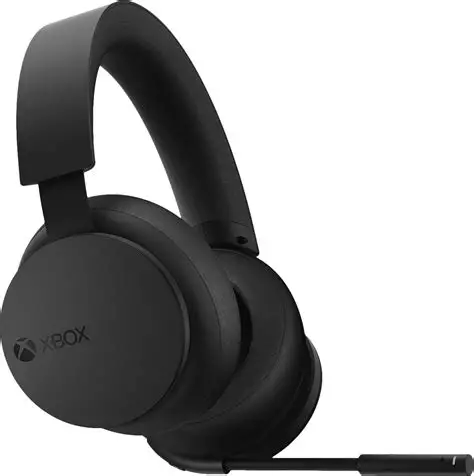
The Xbox Wireless Headset V2 is a refined, console-first wireless gaming headset built for seamless, immersive audio across Xbox Series X|S, Xbox One, PC (Windows), and Bluetooth-enabled mobile devices. It brings together comfort, convenience, and modern spatial sound — making it a strong all-around choice whether you’re gaming, chatting, or streaming.
• Immersive Spatial Audio
The headset supports spatial audio standards — Windows Sonic, Dolby Atmos, and DTS Headphone:X — giving you a broader, more realistic soundscape where footsteps, explosions, music, and environmental sounds feel layered and directional. Dolby Atmos is included at no extra cost.
With 40 mm neodymium drivers, a frequency response of ~20 Hz–20 kHz, and 32 Ω impedance, it delivers solid clarity and detail across lows, mids, and highs.
• Comfortable & Intuitive Design
Weighing about 320 g, the V2 remains light enough for long gaming sessions.
It features soft, over-ear cushions and an adjustable headband for a snug yet comfortable fit.
On-ear controls let you easily adjust volume (right earcup) and balance game audio vs. chat audio (left earcup) — ideal for quick in-game tweaks without opening menus.
• Connectivity & Convenience
The V2 can connect directly to your Xbox console wirelessly — no dongle or base station needed — just like a controller.
You can also pair it via Bluetooth to a PC or mobile device. That means you could be gaming on your console and still take a Discord call or listen to music on your phone at the same time.
• Improved Mic & Clear Chat
The built-in mic uses a bendable boom with dual microphones. The V2 upgrade adds enhanced auto-mute and voice-isolation features, which help suppress background noise and improve chat clarity — useful for group games and voice calls.
When the mic is active, an LED indicator lets you know it’s live.
• Battery Life & Practical Use
If you only have 30 minutes, that’s usually enough for ~4 hours of playback — convenient if you need a quick top-up before a session.
Recharging to full typically takes around 3 hours when not in use.
• Customization & Flexibility
Through the Xbox Accessories app, you can fine-tune EQ settings, adjust bass, mic sensitivity, LED brightness, and even swap the balance/volume dials to suit your preferences.
This makes the headset adaptable whether you’re gaming, listening to music or chatting — giving you control over how it performs for different tasks.
• Real-World Considerations
- Because the headset is wireless and optimized for console use, you might notice some limitations on PC compared with wired headsets — especially if you care about passive noise isolation or fully balanced audio.
- Without external noise cancellation, ambient noise can seep in, especially in noisy environments — so it’s best in quieter rooms or gaming spaces.
- The default sound tuning can lean a bit bass-heavy for some, but you can change that via the app or by enabling spatial audio.



Reviews
There are no reviews yet.